마지막 업데이트: 07월 18일


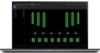
JBL Performance Manager is the next-generation software application designed to configure networked audio systems for corporate and live concert events, as well as systems within performance venues such as theaters and houses of worship. Using Performance Manager dramatically reduces design time, simplifies networking and automates control interface configuration. The patented workflow paradigm of the Performance Manager interface guides the system designer through the complete system design, configuration and control process and, in many ways, the entire process feels and acts like a simple step-by-step wizard. Networking has been reduced to a simple drag-and-drop operation, and all test, tuning and calibration control interfaces are embedded – no need to spend time designing control panels. Integration with Rational Acoustics’ world-renowned Smaart® acoustic testing and measurement software provides audio technicians and engineers with unprecedented access to measurement information—all delivered over the network in one screen. A dedicated show mode provides all the monitoring and control needed to have a complete picture of how the system is performing in real time.


MAIN FEATURES:
- Patented step-by-step design workflow
- Modern look with faster performance
- Included preset support for all JBL Tour Sound products
- Time saving and accurate integration with JBL’s LAC-II and LAC-III software
- Integration with Rational Acoustics Smaart platform
- Preconfigured system templates for fast deployment
- Multi-touch support on Windows 10 touch-capable devices
- Built in array optimization and tools
- Built in system supervision and loudspeaker test tools
System Requirements
Supported Operating Systems:
- 64-bit versions of Windows 7, Windows 8.1 or Windows 10
Minimum Performance Guidelines:
- CPU: 64 bit dual core @ 2.0GHz or better
- Memory: 4GB
Optimal Performance Guidelines:
- CPU: 64 bit dual core @ 2.50 GHz or better
- RAM: 8GB or more
- OS: 64-bit Windows 7 or above
- Storage: SSD
Performance Manager 2.9.0
New Features
Added support for the following products:
- VTX A6, VTX B15
Full-screen Mode:
- A new full-screen mode is now available to improve usability on devices with small screens. Full-screen mode can be activated via the new button on the titlebar or via the keyboard shortcut keys (F11 or ctrl + shift + F).
Line Array Control Panel (LACP) improvements:
- The LACP filters are no longer applied to subwoofers when used in mixed arrays. For example, the Array Size Compensation filter will no longer attenuate the subwoofers.
Daylight Mode Improvements:
- Added option for Daylight Mode to be set manually or set to follow the theme of the operating system.
Repeating Array Template improvements:
- The array names under the System Groups panel are now the same as the array names in the venue. Changing one will change the other.
- Grouping options can now be changed after the arrays have been created. To change grouping options, navigate to Add Templates mode, highlight one of the arrays and click on the gear icon over the array.
General Improvements
- Addressed an issue with the software installer where the C++ Runtime module failed to install.
- Updated the End User License Agreement.
Bug Fixes
- Fixed a software crash when associating multiple amplifier channels at once.
- General bug fixes and improvements.
 다운로드
다운로드