อัปเดตล่าสุด: 01 ก.ค.
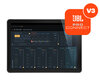
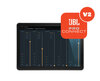
JBL Pro Connect App v3.0 Features & Enhancements
New in Version 3.0
- Account Management – Save snapshots to the cloud for easy recall across devices.
- Basic Mode – Toggle between Advanced Mode and a simplified interface with essential volume and mute controls.
- Bug Fixes & Performance Improvements – General stability enhancements and overall performance optimizations.
Powerful Control Features:
- Mixer & DSP Control – Manage mixer and DSP settings with access to a variety of built-in presets.
- Bluetooth® 5.0 Connectivity – Connect and control up to 10 JBL Pro Connect-enabled speakers simultaneously.
- Enhanced Speaker Grouping – Organize speakers more efficiently for faster system setup and control.
- Channel Grouping – Group channels for streamlined mixing and simplified operation.
- Customizable Workflow – Rename channels, organize speakers, and tailor the interface to your preferred workflow.
- In-App Media Controls – Play and pause music directly within the app using the integrated media control widget.
- Demo Mode – Explore app features, create system configurations, and save presets without connecting to speakers.
- Full Screen Mode – Expand your workspace for more precise fader adjustments and system control.
- MIX OUT Pre/Post-Fader Support – Toggle between pre- and post-fader output modes to suit different applications.
- Localized Snapshot Support – Save snapshots in supported local languages when the corresponding keyboard is enabled on your device.
 ดาวน์โหลด