Opening and Saving Files to Devices on the Network
The Performance Venue File is automatically saved to the memory of any synchronized devices as long as the feature is enabled from the Settings Window. If a computer crashes or an operator needs to control a system without the original Venue File, a copy can be retrieved from any device on the network, allowing them to quickly resume control.
Saving to the Network
To save a Venue File to devices on the network, simply save the file locally on the device running Performance and a copy of the file will automatically be pushed to any connected devices.
When changes are made to a locally saved file, the new version of that file is sent to any connected devices automatically.
Recalling from the Network
To recall a Venue file from devices, begin by connecting the devices and Performance to the same network. Any device that is visible and connected in NetSetter can be used to recall a saved Venue File.
When the application is launched or when "Open From Network" is run from the Main Menu, the application will scan the discovered devices for saved Venue files.
After the devices have been scanned, the most recently saved file will be presented in a dialog box.
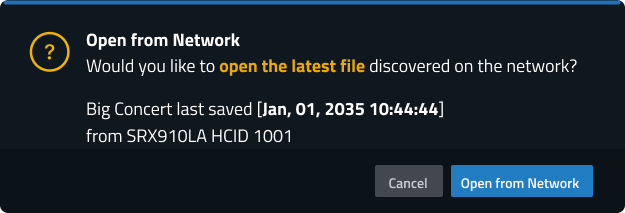
Selecting  will load the file from the indicated device into the workspace. Be sure to then save the file locally.
NOTE: If a specific file from a specific device needs to be recovered, it is best to connect only to that device directly.
